1. IntroductionThis lesson is a brief overview of game management. More properly, it should be called match management, as the issue is how to manage individual matches of games, not the games themselves. We start with an overview of the General Game Playing ecosystem and the central role of the Game Manager. We then discuss the General Game Playing communication protocol, i.e. the messages that players must handle and the messages they must send. Finally, we see how the ecosystem works in a sample game. 2. Game ManagementA diagram of a general game playing competition ecosystem is shown below. At the center of the ecosystem is the game manager. 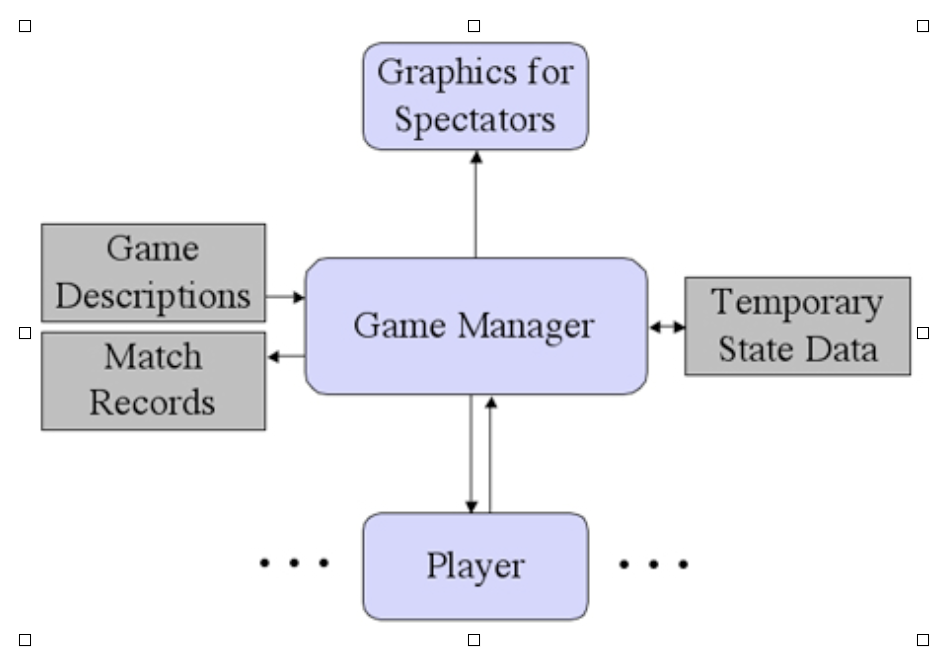
The game manager provides a user interface for users who want to schedule matches, and it provides graphics for spectators watching matches in progress. The game manager also maintains a database of game descriptions and match records, and it maintains some temporary state for matches while they are running. Most importantly, the game manager communicates with game players. Communication typically takes place through message passing. In early versions of GGP, communication was accomplished through the exchange of TCP/ip messages between a manager and players usually running on different machines. In the current version, the players and manager run on the same machine, and communication takes place by local message passing. 3. Game Playing MessagesThe game manager typically uses five types of messages to communicate with players - ping, start, play, stop, and abort. The significance and expected responses to these message are described below. Players use reply messages to respond to these messages.
(1) A ping message is used by the game manager to confirm that a player is up and running. The message is a compound expression in the form shown below. Upon receipt of a ping message, if a player is ready to receive messages, it is expected to reply with the result ready. If the player is not ready to receive messages, it should return busy. If a player does not reply affirmatively within a fixed time period (usually 5 seconds), the game manager assumes the player is not ready to play. (2) A start message is used by the manager to inform players about a new instance of a game. The general form of a start message is shown below. The message begins with the keyword start, and this is followed by four arguments, viz. a role for the player to play (chosen from the roles mentioned in the game description), a ruleset (written as sentences in GDL), a start clock (in seconds), and a play clock (also in seconds). Upon receipt of a start message, a player should prepare itself to play the match. Once it is done, it should reply ready to tell the Game Manager that it is ready to begin the match. The GGP protocol requires that the player reply before startclock seconds have elapsed. If the Game Manager has not received a reply by this time, it will proceed on the assumption that the player is ready. (3) A play message is used to inform players of the most recent move in the match and to request the next move from the player in control. The general form of a play message is shown below. It includes the move made by the player in control on the preceding step. On the first request, since there is no preceding move, the move field is the default value nil. Upon receipt of a play message, a player uses the move information to update its state as necessary. If it is the player in control, it then computes its next move and submits that move to the game manager. Otherwise, it does not reply.
The GGP protocol requires that the player in control reply before playclock seconds have elapsed. If the Game Manager has not received a reply by this time or if it receives an illegal action, it substitutes a random legal action. If the Game Manager receives a play message from a player not in control or if the message has the wrong message identifier, it simply ignores that message. (4) A stop message is used to tell players that a match has reached completion. The general form of a stop message is shown below. Upon receipt of a stop message, a player can clean up after playing the match. The move is sent along in case the player wants to know the action that terminated the game. No reply is required. (5) An abort is used to tell a player that a match is terminating abnormally. It differs from a stop message in that the match need not be in a terminal state. A player's abort handler typically eliminates any match-specific data structures and returns to a ready state. No reply is required. 4. ExampleThe process of game play goes as follows. Upon receiving a request to run a match, the Game Manager first sends a start message to each player to initiate the match. Once game play begins, the manager sends play messages to each player to get their plays; and it then simulates the results it receives (or the one it computes in case there is no legal answer before the play clock is exhausted). This part of the process repeats until the game is over. The Manager then sends a stop message to each player. Here is a sample of messages for a quick game of Tic Tac Toe between players indy and lara coordinated by a game manager named manager. The game manager initiates the match by sending a start message to all of the players, each with a different role. The players then respond with ready replies. They can respond immediately or they can wait until the start clock is exhausted before responding.
Play begins after all of the players have responded or after the start clock has expired, whichever comes first. The manager initiates play by sending an in initial play message to each of the players. Since this is the first move and there are no previous moves, the move argument in the play message is nil.
In this case, the first player is in control and submits the action mark(1,1), one of its nine legal actions.
The Game manager checks that indy is the player in control and that this action is legal; it simulates the effects of the action; it updates the state of the game; and it then sends play messages to the players to solicit their next actions. The second argument in the play message this time is the action received in response to the preceding play message.
On this step, the second player is in control and it submits mark(1,2). This is a legal move, but it is not a wise move, as the game is now strongly winnable by first player.
Again, the Game Manager checks legality, simulates the move, updates its state, and sends a play message to all the players.
The first player takes advantage of the situation and replies mark(2,2), essentially guaranteeing it a win.
Again, the Game Manager checks legality, simulates the move, updates its state, and sends a play message to all the players.
There is not much the second player can do in this situation to save itself. Instead of staving off the immediate loss, it responds with mark(1,3).
The Game manager simulates and updates, as before, and informs the players.
In this case, the first player goes in for the kill, playing mark(3,3).
With this move, the game is over. As usual, in such cases, the Manager lets the players know by sending a suitable stop message. It then stores the results in its database for future reference and terminates.
Note that the Game Manager sends slightly different start messages to the different players. Everything is the same except for the role that each player is asked to play. In all other cases, the same messages are sent to all players. In advanced versions of the General Game Playing protocol, this symmetry is broken. The Game Manager can send different game descriptions to different players. And it can tell different players different information in the play and stop messages. |